Make a free PromptPay QR code for your shop: enter your phone number or ID, add a fixed amount if you like, test it with your bank app and print a counter sign.
📑 In this guide
PromptPay is Thailand's national QR payment system, and almost every customer in Thailand can pay with it from their banking app. In this guide you'll make your own PromptPay QR code on the PromptPay QR page, test it and print a sign for your counter. It takes a few minutes, it's free, and you'll need the phone number or ID linked to your PromptPay account.
Make your PromptPay QR code in 3 steps
1. Enter your PromptPay details
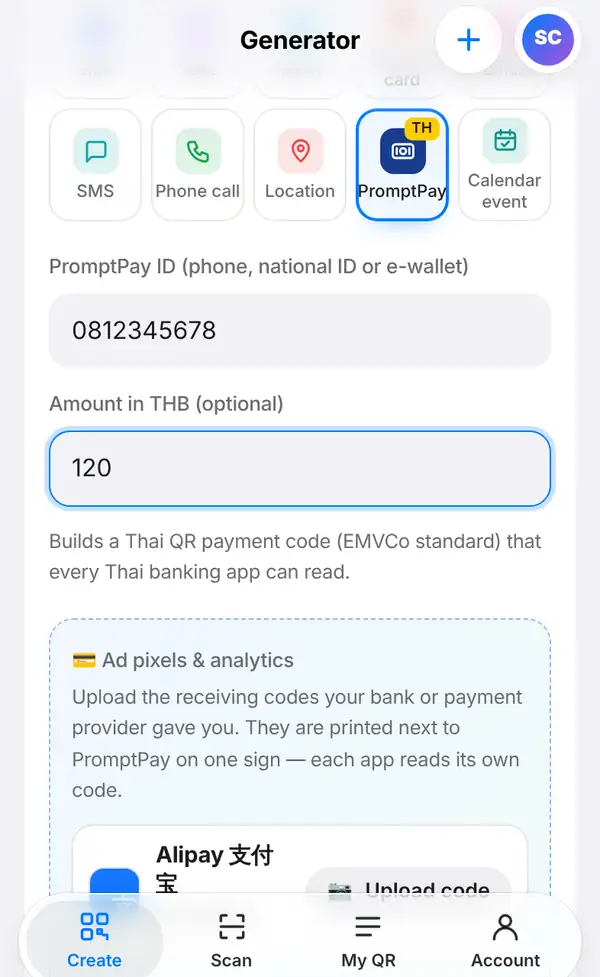
Open the PromptPay QR page, or go to Create, open the Basic group and tap PromptPay.
In PromptPay ID (phone, national ID or e-wallet), type the number that's linked to your PromptPay account – for example 0812345678. It must be exactly the number you registered with your bank.
If you'd like every customer to pay the same price, fill in Amount in THB (optional), for example 120. Leave it empty if you want customers to type in the amount themselves, which is best for a shop where every bill is different.
The code follows the Thai QR Payment (EMVCo) standard, so it works with every Thai banking app.
Serving visitors from China? Just below, there's a box to also accept Alipay and WeChat Pay. Upload the Alipay or WeChat Pay QR you got from your bank or payment provider, and it's printed next to your PromptPay code on the same sign. Each app reads its own code.
2. Check and download
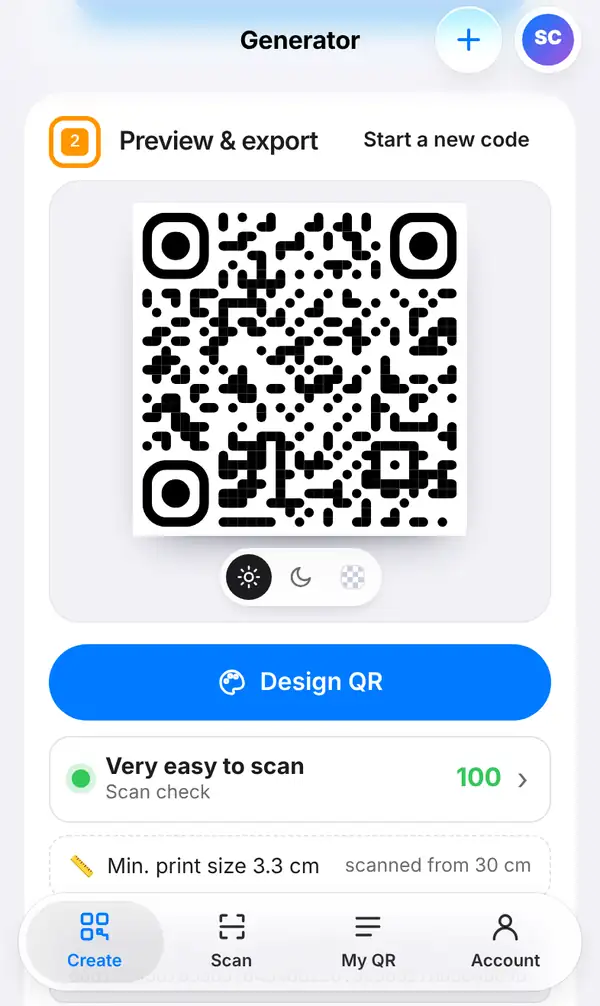
Scroll down to Preview & export. Make sure the Scan check row is green, and note the smallest print size.
Then press Export image to download the code, or Print-ready sign (PDF) to get a tidy sign to stand by the till. You can also press Design QR to add colours or a frame first; just keep good contrast so every banking app reads it easily.
3. Test it with your own bank app
Before you print, open your own banking app, scan the code and check the name shown on the payment screen. It must be your name or your shop's name. If it's not, don't use the code: check the number you typed.
You don't need to finish the payment to test it; just check the name and, if you set one, the amount.
Once it's in use, check every payment slip a customer shows you, and make sure the money has really arrived in your account. Our tutorial on how to check a payment slip explains how.
QR-TH takes no fees: the money goes straight from your customer's bank to yours.
Tips for PromptPay at your shop
- Leave the amount empty for a counter sign; use a fixed amount only for one-price items or events.
- Put the sign where customers can scan it without reaching over the counter.
- Check now and then that nobody has stuck a different QR code over yours.
- Keep an eye on your bank notifications, not just on the customer's screen.
- Read our PromptPay QR guide for shops for more ideas.
FAQ
Does QR-TH charge a fee?
No. QR-TH only makes the code. The payment goes directly to your bank account.
Which number should I use?
The phone number, national ID number or e-wallet ID that you registered for PromptPay with your bank.
Can tourists pay with this code?
Thai banking apps can pay it. For visitors from China, add your Alipay or WeChat Pay QR in the box under the PromptPay fields.
Do I need an account?
No. A PromptPay QR code is a static code, so you can make and download it free without signing up.
Make your PromptPay QR code. Related: PromptPay QR for shops and how to check a payment slip.