A free QR code generator with no ads: no ad pages for your customers, no watermark, no sign-up, and static codes that never expire. Make yours now.
📑 In this guide
- Why a free QR code generator with no ads matters
- Free forever: no account, no watermark, no expiry
- Many kinds of QR code, made for shops
- Design it, then check it will scan
- Safe links for you and your customers
- When a free account is worth it
- Make your free QR code in 3 steps
- 1. Choose the kind of QR code
- 2. Fill in your details
- 3. Design, check and download
- FAQ
- Is QR-TH really free with no ads?
- Do free QR codes expire?
- Is there a watermark on free QR codes?
- Can I change a QR code after printing?
Looking for a free QR code generator with no ads? QR-TH makes a QR code for a link, Wi-Fi, a business card or a payment in about a minute, with no ad banners while you work, no ad page for the people who scan and no watermark on the code. Open the free QR code generator and download your code without signing up.
Why a free QR code generator with no ads matters
A QR code is a promise to your customer: scan this and you get the menu, the price list or the Wi-Fi password. Some free generators break that promise. They put an advertising page between the scan and your link, or they quietly switch a "free" code off after a trial, often after it is already printed on your flyers.
QR-TH works differently. The website itself shows no advertising banners, and the people who scan a QR-TH code never see an advertisement page. A static code goes straight to its content, so your guest sees your Wi-Fi details or your website, not someone else's offer. That matters for a café that prints codes on every table, and just as much for a wedding invitation or a school notice.
Free forever: no account, no watermark, no expiry
Anyone can make a static QR code and download it free, with no account, no watermark and no ads. A static QR code holds the data itself, inside the black and white pattern. Nothing has to stay switched on at our end, which is why it never expires. Print it on a shop window today and it keeps working for as long as the content behind it does.
You can download the code as PNG, JPG or SVG, or as a print-ready sign in PDF that you can stick on the counter straight away.
Many kinds of QR code, made for shops
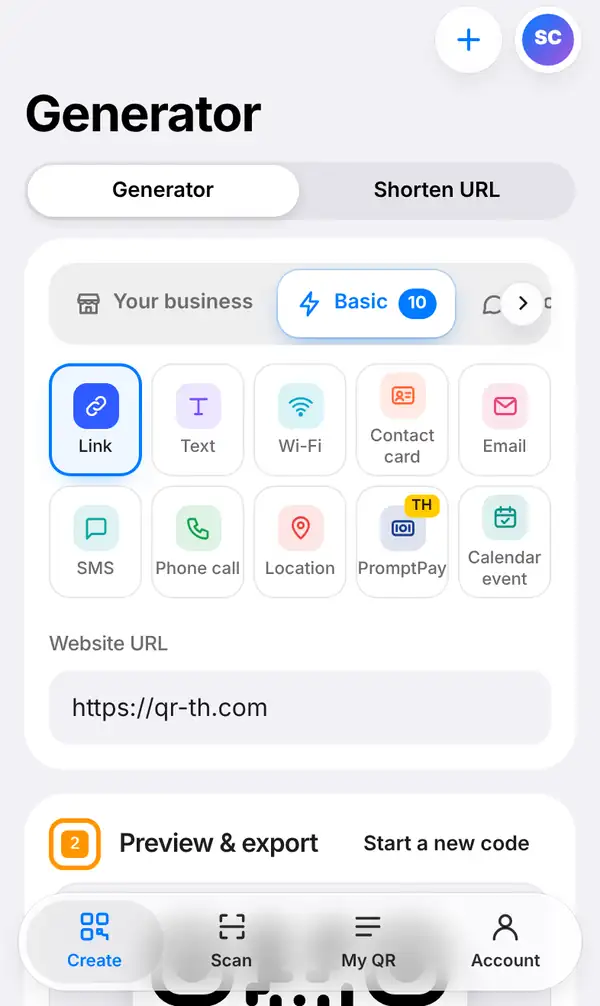
Open Create and you land on the Generator. At the top you can switch between the Generator and Shorten URL. Below that, pick the kind of code: a link, plain text, Wi-Fi, a contact card, e-mail, SMS, a phone call, a location, PromptPay, a calendar event, LINE, social profiles and more. The "Your business" group gathers the codes shops use most. The whole site works in 20 languages, so you can make your code in the language you think in.
Some everyday examples: a market stall puts a PromptPay code next to the till, a guesthouse frames a Wi-Fi code by the bed, a plumber adds a contact card code to the van, and an online seller links to their shop page from every parcel.
Design it, then check it will scan
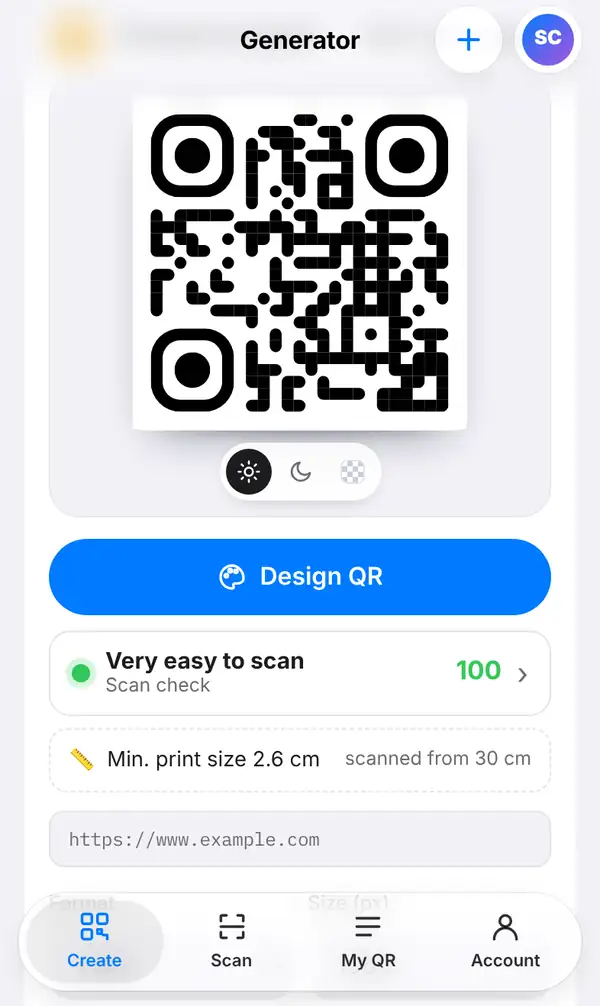
A plain black code works, but you can make it yours. Press Design QR to change the colours, add your logo and choose a frame. Then look at the Scan check score under the preview: it tells you how easily phones will read your design, and shows the smallest print size that still scans. No more guessing whether a tiny code on a business card will work.
Safe links for you and your customers
Every link is checked against lists of harmful sites, including Google Safe Browsing and QR-TH's own list, and checked again later. If a link turns dangerous after you made the code, people who scan it see a warning instead of the page. Your customers can trust what they scan, and you never accidentally print a bad link.
When a free account is worth it
Static codes cover most needs. Make a free account when you want more:
- Dynamic QR codes: change where the code goes after printing, for a new menu or a new promotion. How many you can have depends on your plan.
- Pages QR-TH hosts for you: a menu, a PDF, photos, a video or a link-in-bio page.
- Scan statistics and notifications: see how many people scan and get told when they do.
Only dynamic QR codes and short links can be counted, because a static code goes straight to its content. Free-plan hosted pages show a small "Made with QR-TH" badge; it is not an ad. The plans are Free, Pro and Business; see pricing for what each one includes.
Make your free QR code in 3 steps
Choose the kind of QR code
Open the generator and pick a kind, for example a link QR code for your website.
Fill in your details
Paste your link, or type the Wi-Fi name and password, or your contact details. The preview updates as you type.
Design, check and download
Add colours and a logo if you like, look at the Scan check, then download PNG, JPG, SVG or the print-ready PDF.
FAQ
Is QR-TH really free with no ads?
Yes. Static QR codes are free to make and download, with no account. The site shows no ad banners and people who scan your code never see an ad page.
Do free QR codes expire?
A static QR code never expires, because the data is stored in the code itself. It keeps working as long as the content it points to exists.
Is there a watermark on free QR codes?
No. The code you download is clean, with no watermark. Only pages that QR-TH hosts on the free plan carry a small "Made with QR-TH" badge.
Can I change a QR code after printing?
Only a dynamic QR code can be changed after printing. Create a free account to make one. Read static vs dynamic QR codes to choose.
Ready to try it? Make your free QR code now, no sign-up needed. Want the full walkthrough? Read how to create a QR code or learn about QR code scan notifications.